


Download JioSaavn – Free Hindi Music, Bollywood Hits & Radio Streaming App
Overview & Core Features
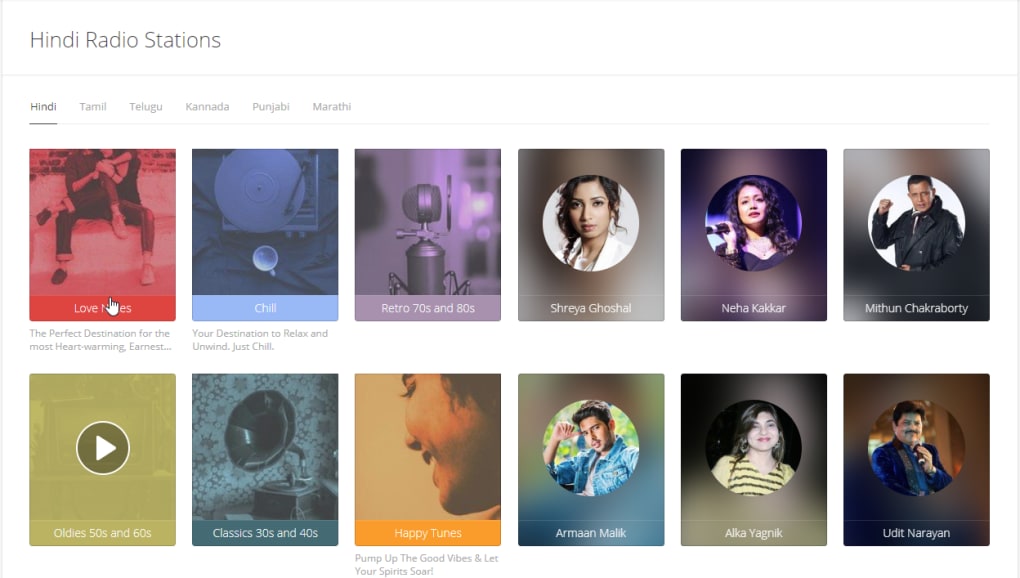
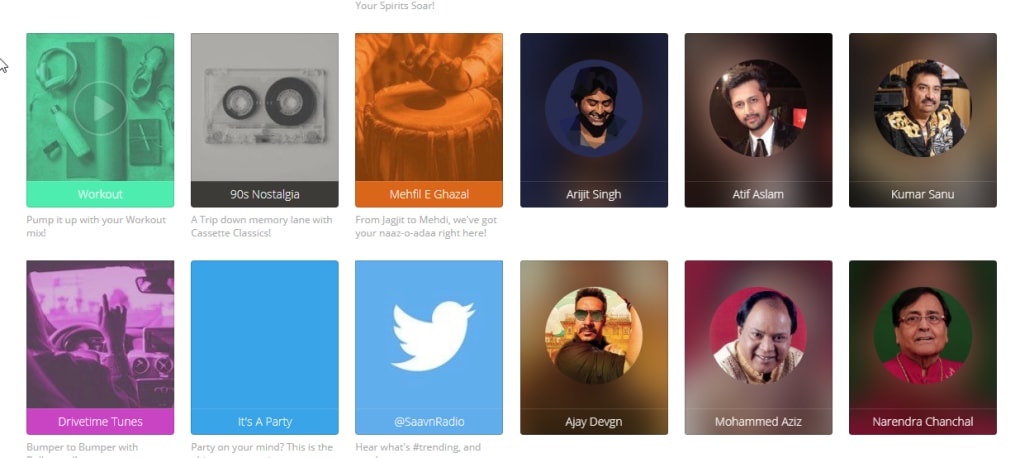
JioSaavn is a fast‑growing multimedia application created by Saavn Media Pvt. Ltd. that brings together a massive catalog of more than 45 million tracks spanning Bollywood, regional Indian music, international pop, and niche genres. The platform is designed for mobile users who want instant access to curated playlists, live radio stations, original podcasts, and exclusive shows.
JioSaavn’s clean, adaptive UI lets listeners personalize their experience by creating custom playlists, following favorite artists, and switching between light and dark modes. A free tier offers ad‑supported streaming, while the optional JioSaavn Pro subscription unlocks high‑quality 320 kbps downloads for offline listening, ad‑free playback, and priority access to new releases. The app constantly updates its library, ensuring that the latest chart‑busters and timeless classics are just a tap away.
- Access to over 45 million songs across multiple languages and genres.
- Curated playlists, radio stations, and AI‑driven recommendations.
- Original podcasts, audio shows, and exclusive artist interviews.
- High‑quality 320 kbps offline downloads with JioSaavn Pro.
- Personalized UI with dark mode, custom playlists, and lyric sync.
- Ad‑supported free tier and ad‑free premium experience.
- Cross‑platform syncing for seamless transition between devices.
- Regular content updates and new feature rollouts.
Installation & Usage Guide
Getting started with JioSaavn is straightforward, regardless of whether you use Android, iOS, Windows, or macOS. Follow these steps for a hassle‑free installation:
Android & iOS
- Open the Google Play Store (Android) or the App Store (iOS).
- Search for “JioSaavn” and tap the Install button.
- Once the download completes, launch the app and grant permissions for storage and notifications.
- Create a new account using your email, mobile number, or social login (Google/Facebook).
- Complete the onboarding tutorial to set your preferred music genres and language preferences.
- Start exploring curated playlists, search for your favorite tracks, or tune into live radio stations.
Windows & macOS (Desktop)
- Visit the official JioSaavn website and click the “Download for Windows/macOS” link.
- Run the installer and follow the on‑screen instructions to place the application in your Applications folder (macOS) or Program Files (Windows).
- Launch the desktop client, sign in with your existing credentials, and synchronize your library.
- Use the built‑in equalizer and playback controls to fine‑tune your listening experience.
For the best performance, ensure your device runs the latest OS version and has a stable internet connection. The app automatically saves your playback history, so you can pick up where you left off on any device. Pro users can download songs for offline playback by tapping the download icon next to each track or playlist, then selecting the desired audio quality. The intuitive search bar supports voice input, lyric snippets, and fuzzy matching, making it easy to locate songs even with partial information.
Compatibility, Pros & Cons
JioSaavn is compatible with a wide range of operating systems, including Android 5.0 and above, iOS 12.0 and above, Windows 10 or newer, and macOS 10.13 or later. The application also offers a responsive web player for users who prefer streaming directly from a browser without installing additional software.
Pros
- Vast library with diverse regional and international tracks.
- Free tier provides unlimited streaming with minimal restrictions.
- High‑quality offline downloads in the Pro plan.
- Personalized recommendations powered by AI.
- Regular updates keep content fresh and add new features.
- Cross‑device synchronization for seamless listening.
Cons
- Free version includes occasional audio ads.
- Some regional tracks may be limited due to licensing.
- High‑resolution audio (320 kbps) is locked behind the Pro subscription.
- Occasional UI glitches on older Android versions.
- Data usage can be high when streaming without Wi‑Fi.
Frequently Asked Questions
Is JioSaavn free or does it require a subscription?
JioSaavn offers a free tier that includes ad‑supported streaming and limited offline playback. The optional JioSaavn Pro subscription unlocks ad‑free listening, high‑quality 320 kbps downloads, and exclusive content.
Can I download songs for offline listening?
Yes. Free users can download songs at standard quality (128 kbps) for offline listening, while Pro subscribers can download at high‑quality 320 kbps.
Does JioSaavn work on iPad and other tablets?
The app is optimized for both iPhone and iPad, offering the same features across tablets. The web player also works well on any tablet browser.
How does JioSaavn handle data usage?
Streaming at higher bitrates consumes more data. Users can manually set the streaming quality in the app settings to control data usage, especially when not on Wi‑Fi.
Is there a way to create and share playlists?
Absolutely. Users can create custom playlists, add songs from any genre, and share them via a unique link or directly to social media platforms.
Conclusion & Call to Action
JioSaavn stands out as one of the most comprehensive music streaming solutions for Indian and global audiences. Its massive catalog, intelligent recommendation engine, and seamless cross‑platform experience make it a top choice for both casual listeners and dedicated audiophiles. While the free version does contain ads, the optional Pro plan offers a competitive price point for ad‑free, high‑quality offline listening. Whether you’re on Android, iOS, Windows, or macOS, JioSaavn delivers a reliable, feature‑rich environment that keeps you connected to the latest Bollywood hits, regional gems, and international chart‑toppers.
Ready to dive into an endless stream of music? Download JioSaavn now and start exploring curated playlists, live radio stations, and exclusive podcasts. Upgrade to JioSaavn Pro for the ultimate listening experience—high‑resolution audio, offline access, and zero interruptions.
Pros: Vast library, free tier, high‑quality Pro downloads, cross‑device sync.
Cons: Ads in free version, occasional UI hiccups on older Android.



.png)



